What Intuitive Design Makes Hotel TV Solutions Effortless for Guests?
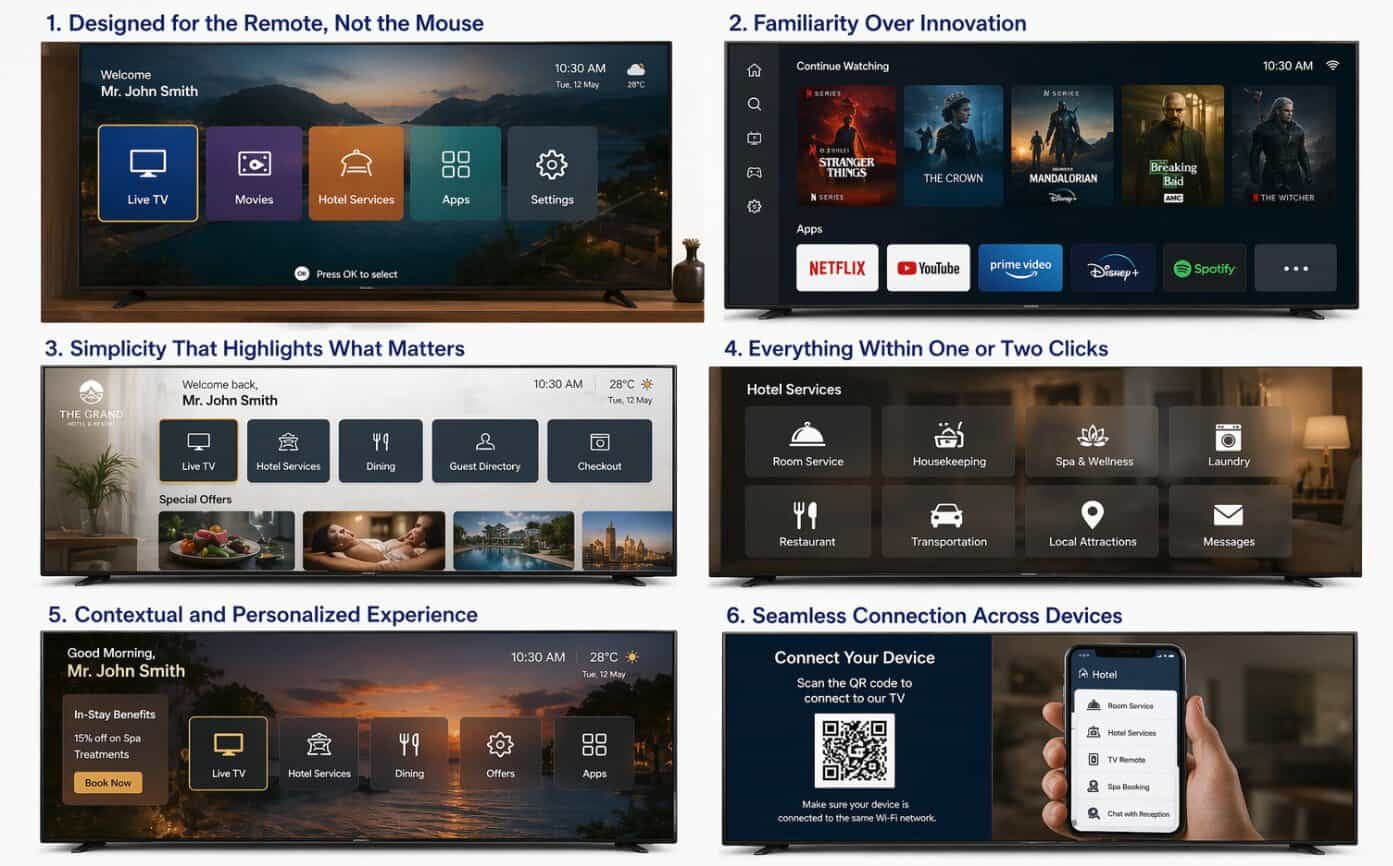
When you walk into a hotel room, you want the TV to work right away. You do not want to learn a new system or call the front desk for help. Intuitive design makes hotel TV solutions effortless by keeping controls simple, familiar, and easy to navigate with just a remote and a few clear on-screen choices.
You benefit from layouts built for the remote, not a mouse. Clear menus, large icons, and one- or two-click access to streaming, live TV, and hotel services help you find what you need fast. The system feels natural because it mirrors the apps and platforms you already use at home.
You also get a smooth device connection and personal options without extra steps. Secure casting, simple sign-in, and tailored content let you enjoy your stay without confusion. The result is a TV experience that supports your comfort instead of slowing you down.
1. Designed for the Remote, Not the Mouse
You design hotel TV systems for the remote control, not for a keyboard or mouse. Guests sit on a bed or sofa, not at a desk. They expect to press a few buttons and get what they need.
An intuitive layout keeps the focus on simple navigation. Large icons, clear labels, and limited menu layers help guests move fast. You avoid deep submenus that force guests to click through five or six screens.
Core design rules for remote-first systems:
Use directional arrows for all navigation
Limit choices on each screen
Keep text short and easy to read
Highlight the current selection clearly
You also place the most used features first. Live TV, streaming apps, room service, and hotel information should appear on the home screen. Guests should not need instructions to find them.
Modern hotel TV solutions often include interactive features like in-room dining orders, promotional messages, or service requests. You present these options in the same clear format as entertainment content. This keeps the experience consistent.
A remote-based design also respects physical comfort. Guests should operate the system with one hand and minimal effort. When every action feels direct and predictable, the technology fades into the background and the stay feels smooth.
Simplicity That Highlights What Matters
You want guests to turn on the TV and know what to do right away. Intuitive design keeps the screen clean and free from clutter so they can focus on what matters.
A simple home screen should show only the most useful options, such as:
- Live TV
- Streaming apps
- Hotel services
- Wi‑Fi details
- Room controls (if available)
When you limit choices, you reduce confusion. Guests spend less time searching and more time enjoying their stay.
Clear labels and familiar icons also matter. Many modern hotel TV systems use layouts that feel like the streaming platforms guests already use at home. This reduces the learning curve and lowers support calls to the front desk.
You should also avoid complex remote controls. Fewer buttons and clear navigation keys help guests move through menus with ease. Some systems allow guests to connect their own devices and stream without shared accounts, which adds convenience and privacy.
Use large text, simple language, and high contrast colors. These design choices make the interface easier to read for all ages.
When you remove distractions and highlight core features, your TV system becomes a helpful tool instead of a challenge.
Everything Within One or Two Clicks
When you design a hotel TV system, you should let guests reach key features in one or two clicks. Guests do not want to search through deep menus or long lists. They expect fast access and clear choices.
Place the most used options on the home screen. Keep the layout simple and limit the number of main items.
Common one- or two-click features include:
- Live TV
- Streaming or casting
- Room service ordering
- Housekeeping requests
- Bill review and checkout
- Local information and weather
- You can connect the TV to your property management system. This lets guests check their bill, order food, or book a spa service without leaving the main screen. The TV becomes a control center, not just a screen.
Use large icons and short labels. Avoid technical terms. For example, say “Order Food” instead of “F&B Services.”
Limit each path to two steps whenever possible. If a task takes more than that, simplify the flow.
When guests can act quickly and without confusion, they feel in control. That ease reduces support calls and improves their stay.
Familiarity Over Innovation
You do not need to impress guests with complex features. You need to make the TV feel easy and familiar from the first click.
Most guests compare your in-room TV to the one in their living room. They expect streaming apps, simple menus, and quick access to content they already use.
When you design for familiarity, you reduce stress and support calls.
Focus on what guests already know:
- Clean home screen with clear icons
- Access to popular streaming apps
- Simple casting from personal devices
- No shared login accounts
- Straightforward remote controls
Guests should not need instructions to watch TV. If they must learn a new system, frustration builds fast.
A familiar layout also lowers staff workload. When guests can connect their device and stream without help, your front desk handles fewer tech issues.
| Complex Design | Familiar Design |
| Custom menus with many layers | Simple, flat navigation |
| Unique remote layouts | Standard remote buttons |
| Hidden settings | Clear, labeled options |
Innovation still matters, but it should work in the background. Strong Wi‑Fi, secure casting, and smooth app performance support the experience without changing how guests interact with the screen.
When your system feels natural, guests relax. They focus on their stay, not on figuring out the TV.
Personalized Experience
You expect your hotel room TV to feel familiar the moment you turn it on. Intuitive hotel TV solutions make that happen by adapting the screen to your needs, not the other way around.
When you enter your room, the TV can greet you by name and display options tied to your stay. You can see your reservation details, local weather, and hotel services without searching through menus.
Many systems let you stream your own content using tools like built-in casting. You use the apps already on your phone, so you do not need shared accounts or extra remotes.
Personalized features often include:
- Custom welcome messages
- Streaming from your personal device
- Language selection
- Service suggestions based on your stay
- Easy access to dining, spa, and checkout
Some platforms also adjust content based on your profile or travel purpose. For example:
| Guest Type | On-Screen Focus |
| Business traveler | Wi‑Fi details, meeting rooms, express checkout |
| Family | Kids’ content, dining hours, local attractions |
| Leisure guest | Spa offers, tours, hotel events |
You stay in control at all times. Clear menus and simple navigation let you choose what matters to you, without calling the front desk for help.
This level of personalization reduces friction and saves time. You get quick access to what you want, and the experience feels direct and easy.
Seamless Connection Across Devices
You expect your devices to work together without extra steps. An intuitive hotel TV solution makes that happen as soon as you enter the room.
Modern systems let you connect your phone, tablet, or laptop directly to the in-room TV. You scan a QR code or follow a short on-screen prompt. In seconds, you stream from the apps you already use.
No shared logins. No complicated setup.
Many hotels now support both iOS and Android devices. The system links only your device to your room’s TV, so other rooms cannot see or access your content.
Clear on-screen instructions guide you through each step:
-Connect to the hotel Wi‑Fi
-Scan the QR code on the TV
-Select your device
-Start streaming
The process feels familiar because it mirrors what you do at home. You use your own subscriptions and your own accounts.
Security also stays built in. Many platforms erase login details at checkout through integration with the hotel’s management system. Your personal data does not stay behind after you leave.
When your TV connects easily to your devices, you stay in control. You do not need to call the front desk or learn a new remote. You simply connect, stream, and enjoy your stay.
Conclusion
You create an effortless hotel TV experience when you focus on clarity, familiarity, and control. Guests want to use the TV the same way they use devices at home. When the system feels simple, they engage with it right away.
You reduce friction when you remove extra steps. Clear icons, limited menu layers, and plain language help guests find what they need fast. A familiar layout lowers support calls and frees your staff for other tasks.
Modern hotel TV systems also connect to property systems. This link allows guests to check bills, request housekeeping, or order food from the same screen. When you keep these features organized and easy to access, the TV becomes a practical tool, not just entertainment.
Security also matters. Guests expect privacy when they stream or enter personal details. Automatic logouts and secure casting protect their information and build trust.
When you design your hotel TV solution around real guest behavior, you make every stay smoother. Simple structure, secure access, and seamless control turn the in-room TV into a dependable part of the guest experience.