

Webflow Review: Will You Build Your Website With It?

In this day and age of DIY everything, do you still hire a web developer or designer to build your website? Have you tried designing a website and found it a bit challenging? Did you ever wish you could do so much more than design or create a website and manage its content? If you made three successive yeses, then you’re in for a treat and probably a surprise with our Webflow review.
In this article, we’ll get to know what Webflow is and what it does. Take note that the website builder software market is filled with several code-based and codeless builders, making the competition tough. What makes Webflow any different? We will learn about that and many more and hopefully, help you decide – will you build your website with it?
What is Webflow?
Webflow is a curiosity of sorts because it wears many hats. Being a website builder is just one of its several components. It also provides a content management system (CMS), content delivery network (CDN), email hosting, domain hosting, e-commerce tools, and more. It blends the creative with the technical by being a site designer, website builder, marketing, SEO, hosting, and business platform. And that’s just for starters.
Check if you can get any special discount with our Webflow coupon code article.
Despite being an integrated toolkit, Webflow’s core competencies revolve around three areas – site builder, SEO, and web hosting. As a website builder, it comes with a designer tool that helps you craft content-driven designs. You’ll be able to build a website centered on the type of content that you have. Speaking of content, you’ll have a flexible CMS built right in to manage the many elements of your site.
Once you have your website up and about, the next step is to prime it for growth. For this, you get SEO tools to fine-tune content and growth areas. Furthermore, Webflow provides collaboration features and logic-based workflows for efficiency and productivity. Lastly, it offers security for its tools and workspace as well as web-hosting for a seamless, end-to-end platform from site creation to site maintenance.
Save up to 20%
Special offer available on all yearly plans! Click here to get this special offer 👇
Check Webflow PricingKey Features
- Content Templates
- Custom Domain Name
- Integrations
- Reliable Hosting
- Responsive websites
- SEO optimization
- Website Editor
- Website Security
Pricing
Numerous plans are available for individuals, teams, agencies, and businesses. Discounted prices are offered for annual payments.
Site Plans – Best for content websites and marketing sites.
- Starter – Free
- Basic – $18/month
- CMS – $29/month
- Business – $49/month
- Enterprise – Custom pricing
E-commerce Plans – Ideal for no-code e-commerce business.
- Standard – $42/month
- Plus – $84/month
- Advanced – $235/month
Workspace Plans – For managing multiple sites and collaborating with your team.
- Starter – Free
- Core – $19/month
- Growth – $49/month
- Enterprise – Custom pricing
Highlights
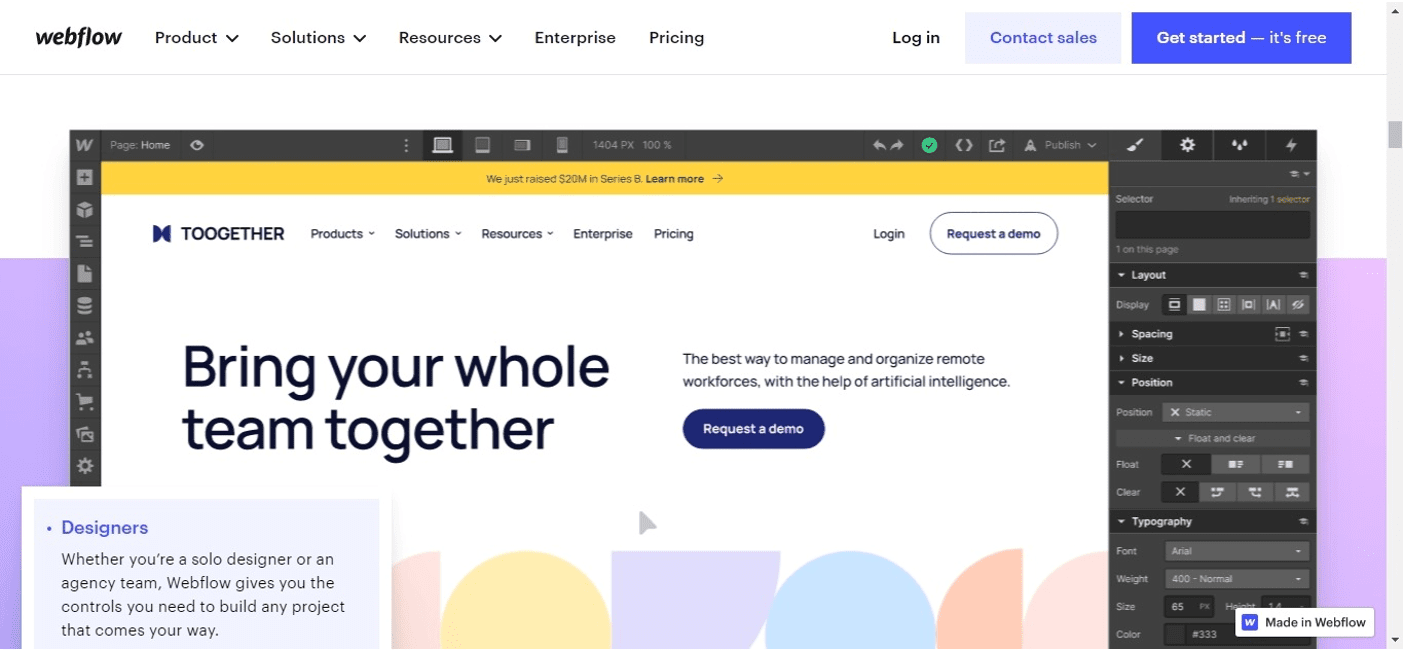
Webflow outshines its rivals and provides a competitive advantage when it comes to the following:
Templates galore
A website template is the starting point of your design. From there you can add elements and build up your website. Webflow offers an exhaustive library containing over 1,000 templates that you can choose from whatever your niche or need whether it is for a blog, portfolio, or business. These are fully-customizable templates that you can tweak using the apps’ codeless design tools.
Design customization
Speaking of customization, Webflow shines in its design capability. You’re given total control over your visual canvas with a drag-and-drop editor to style, layout, and build your website from the ground up. You can also easily add site features like forms, sliders, videos, animations, and interactive content without the need for hiring a professional web developer or mastering HTML and CSS. What’s great about this smart design editor is that when you put in, style, or position elements on the design page, a corresponding code is automatically created by the system. This gives you both a visual editor and a code generator.
Seamless team collaboration
Webflow carries Workspace plans designed for team collaboration and coordination. You can add as many teammates to collaborate with you in real time. This is especially helpful for design teams and agencies who build elaborate websites for big corporate clients. It facilitates sharing insights, information, and project progress with clients, collaborators, and other stakeholders. As such, the app provides useful features such as a team dashboard and client billing function, among others.
Dedicated CMS
An integrated, built-in content management system allows you to readily add whatever content to your design platform without having to search for various folders to get what you need. You simply connect design elements to your collections and work on your content right on the same page. This nifty organizational feature eliminates messy database management and gets work done faster.
Reliable hosting
Since one of Webflows key offerings is web hosting, the product vendor ensures that its app performs flawlessly and that websites built and hosted by Webflow load lightning-fast and runs smoothly. Webflow’s hosting is powered by Amazon Web Servers for unparalleled global infrastructure, and Fastly for ultra-fast content delivery. Webflow guarantees a 99.99% uptime and enterprise-grade web hosting security and scalability.
Broad customer support
Any product with comprehensive features would need equally intensive onboarding, orientation, and support. Webflow prepared for this by putting up its university that provides courses on building portfolios, e-commerce, and business sites using the app. There’s also a user community, discussion and forum, a blog, video tutorials, sample websites made with Webflow, and customer stories and feedback. These are on top of a customer support team ready to take emails and calls.
Low Points
There are two primary issues regarding Webflow.
Steep learning curve
When we speak of software with a “steep learning curve” the first app that comes to mind is Photoshop. Incidentally, Webflow’s user interface looks a bit like Photoshop’s. But that’s not the main pain point, it’s the sheer number of features, functions, and controls that you have to deal with and understand. Nevertheless, the software vendor was responsible enough to provide ample resources to help you get a grip on a versatile and unique application.
Bewildering array of plans
A dozen pricing plans with monthly and annual payment options as well as combination plans for your many specific requirements is kind of a sore point considering that some other website builders carry just three or four plans at most. With Webflow, you’re confronted with so many package choices that you have to scrutinize each of them to see which addresses your needs and is suitable for your situation.
Top Alternatives
The website builder software category is loaded with similarly powerful apps with some offering even more affordable plans. Check out the listing below.
- Wix – Popular and easy-to-use website builder with several pricing plans the most affordable of which goes for $4.50/month.
- GoDaddy Website Builder – Codeless site creator designed for businesses; four paid plans are available starting at $9.99/month.
- Squarespace – Web-based platform for entrepreneurs and e-commerce businesses with four pricing packages starting at $23/month.
- Shopify – Store site builder and marketing solution for online sellers and small businesses; three premium packages are available starting at $29/month.
- Weebly – Powerful and customizable website builder with a free plan and three paid plans starting at $5/month.
Now to our title question – will you build your website with Webflow?
The Verdict
Webflow fits into the requirement in certain areas, if only it was more user-friendly and had straightforward offerings when it comes to its pricing plans. If you’re able to put up with a higher learning curve, Webflow can facilitate an enriching website-building experience with its extensive lineup of tools. And if you like customization, you’ll get your fill with this app.
Of course, don’t just take our word for it. Take the app for a drive and put it at its pace to see how it performs. You can even start building your site with Webflow’s zero-cost plan. Simply sign up here for free to publish your first website.
Check Webflow Pricing






