Wan 3.0 Prime for Website Hero Video: From a 9.2 MB Download to a 289 KB Loop, With the Numbers
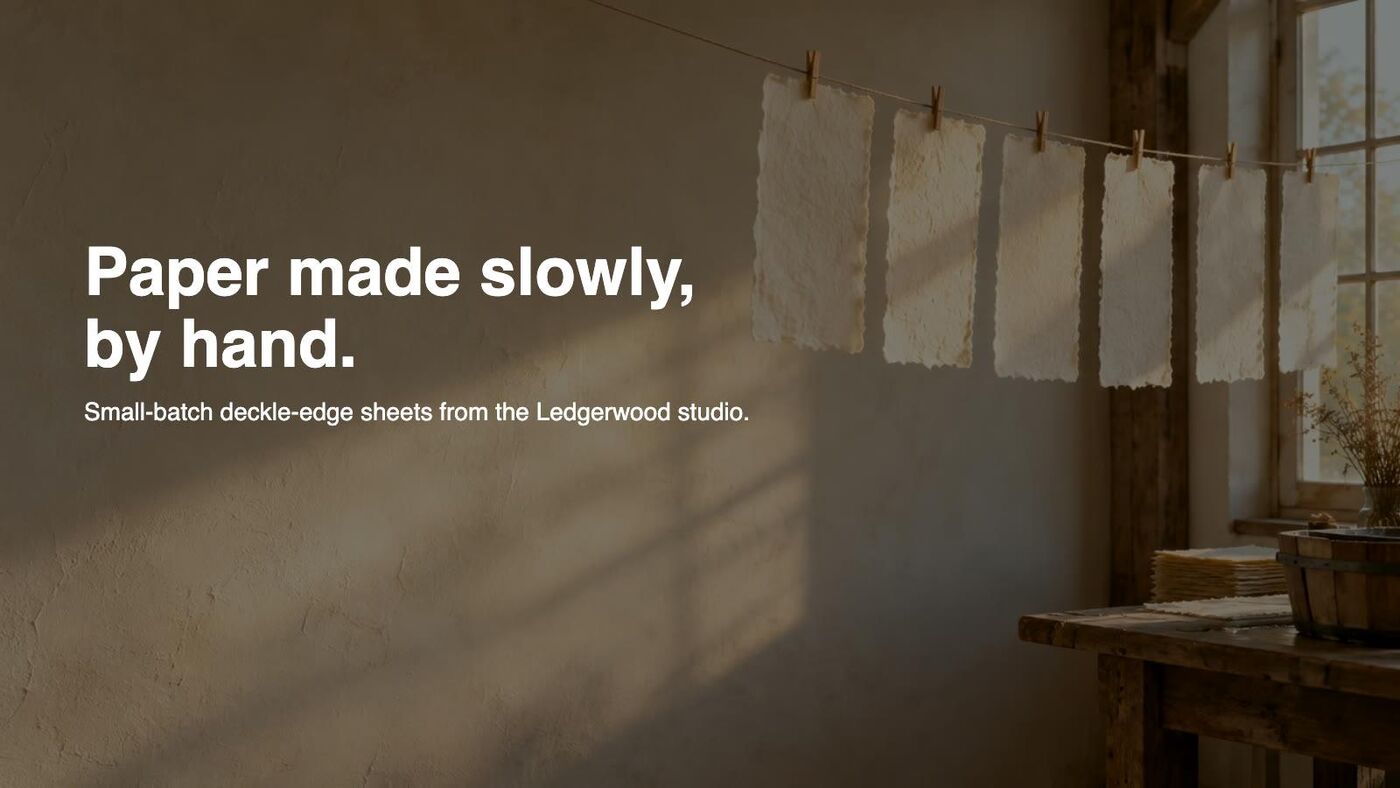
The finished test hero for Ledgerwood, a paper studio we invented for this article. The background is a Wan 3.0 Prime clip under a 50% black overlay.
A background video in a hero section has three jobs. It has to leave room for the headline, it has to loop without an obvious jump, and it has to stay out of the way of the page load. Generative video models make the first version of that clip quick to get. They do not solve any of those three jobs by default.
We wanted to see how much of the problem can be handled in the request and how much has to be fixed afterwards, so we built one hero from scratch. The client is fictional: Ledgerwood, a small handmade paper studio we made up for this test. The brief is a homepage with a left-aligned headline and a calm, looping shot of paper drying on a line. We used Wan 3.0 Prime, Alibaba’s wan3.0-video-prime model, and ran nine tests covering composition, camera movement, audio, loops, portrait crops, encoding, headline contrast and page load.
The test set was 11 clips and one still image, 58 seconds of video in total, for $2.97. Everything below was measured with ffmpeg, ffprobe or a throttled local Chrome run, and we say which. One result surprised us: the clip that scored best on our loop metric still had a visible fault in its last two frames, and only a different measurement caught it.
The setup
Generation is asynchronous. You post a job, poll a task endpoint and download the MP4. Comparison clips were 5 seconds at 480P, the cheapest tier, and we allowed one 8-second 720P clip as the final source. We did not generate 1080P, because none of these tests depend on it. Every clip used seed 73012 unless noted, and the host below is a placeholder.
import os, time, requests

BASE = os.environ["VIDEO_API_BASE"]   # placeholder host
H = {"Authorization": "Bearer " + os.environ["VIDEO_API_KEY"]}

job = {
    "model": "wan3.0-video-prime",
    "prompt": PROMPT,
    "duration": 5,
    "resolution": "480P",
    "size": "16:9",
    "seed": 73012,
    "audio": False,
}
r = requests.post(f"{BASE}/v1/videos/generations", headers=H, json=job, timeout=60)
task_id = r.json()["data"][0]["task_id"]
print("save this before polling:", task_id)

while True:
    t = requests.get(f"{BASE}/v1/tasks/{task_id}", headers=H, timeout=30).json()["data"]
    if t["status"] in ("completed", "failed"):
        break
    time.sleep(10)
print(t["result"]["videos"][0]["url"][0])
Server processing time for the ten 5-second clips ranged from 53 to 276 seconds, with a median of 77. All were submitted at once, so treat that as one reading, not a service level. The 720P clip took 83 seconds. Every task completed on the first submission.
Test 1: asking for room for the headline
A hero clip is a layout element first. We tried three prompts on the same seed. The first was what most people would type:
A beautiful handmade paper studio with sheets of paper drying, cinematic website hero video.
The second described the layout directly:
Wide shot inside a handmade paper studio at early morning. Five cream sheets of paper hang from a thin drying line in the right third of the frame; the left two thirds are a plain, softly lit plaster wall with nothing on it. Sunlight drifts slowly across the wall. No people, no text, no logos.
The third added one more instruction:
Locked-off tripod shot, the camera does not move. The only movement is the light and the sheets swaying very slightly.
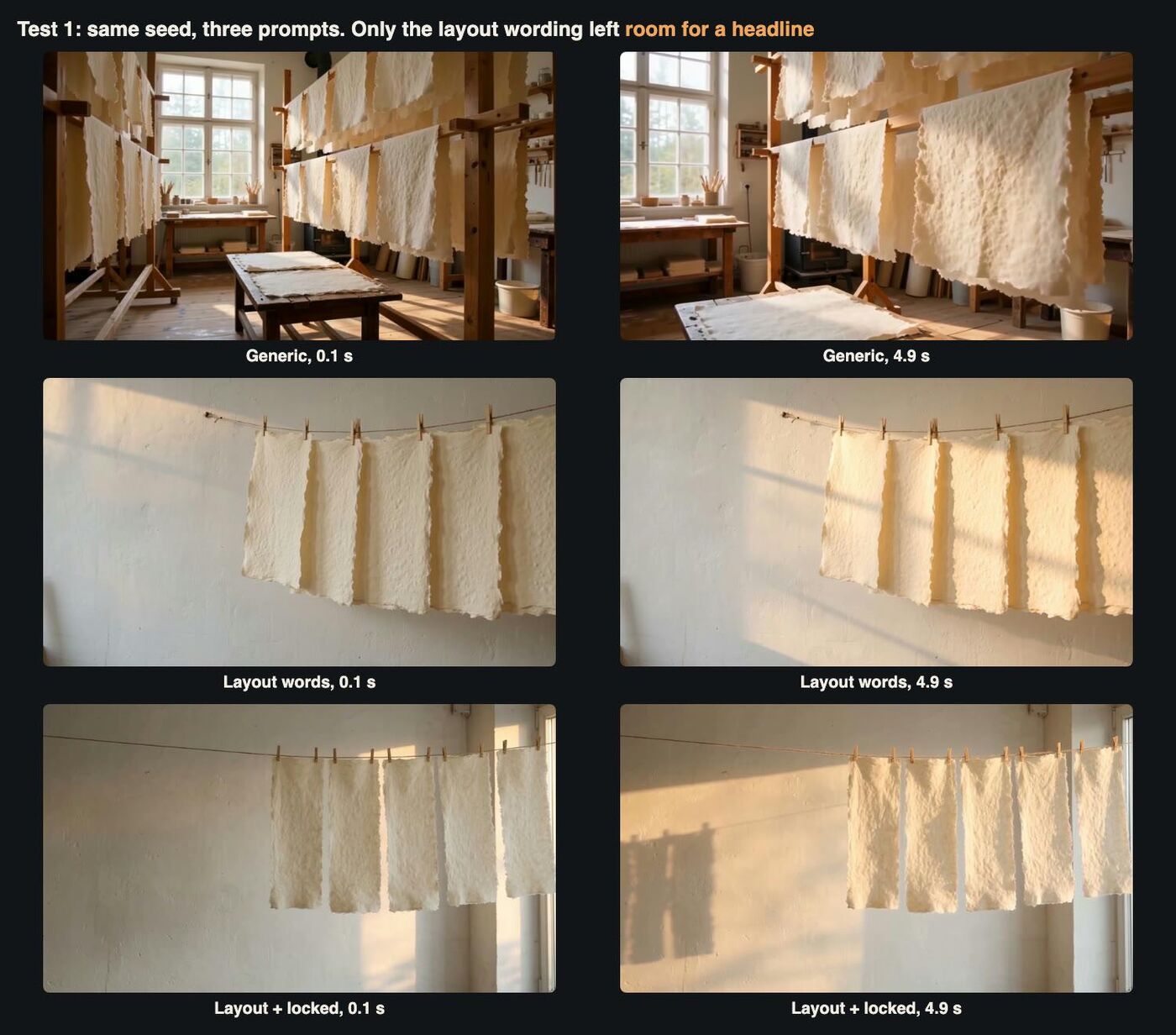
Same seed, three prompts, at the start and end of each 5-second clip. Each cost $0.2314.
The generic prompt gave a good-looking interior that is useless as a background. Racks, windows and furniture fill the frame, and the camera pushed forward without being asked. We measured motion as the mean frame-to-frame change in brightness on a 0 to 255 scale, across the left 60% of the frame where the headline sits. The generic clip scored 5.95. The layout prompt scored 0.45 and the locked-off version 0.57.
The layout wording worked, but loosely. We asked for the right third and the sheets started about 40 to 45 percent of the way across, taking more than half the width. The camera instruction held: the sheets sit in the same position at the start and end of the locked-off clip.
Test 2: what camera movement costs in bytes
We kept the layout prompt and changed the camera: locked-off, “very slow dolly push-in toward the sheets”, and “handheld camera, slowly arcing around the drying line”. To compare fairly we re-encoded each clip the same way, H.264 at CRF 28, 854 by 480, with no audio.
| Clip | Wall motion | Sheet-side motion | Download | H.264 CRF 28 |
|---|---|---|---|---|
| Locked-off | 0.57 | 0.45 | 1,878 KB | 140 KB |
| Slow dolly | 0.83 | 1.42 | 1,958 KB | 158 KB |
| Handheld arc | 1.24 | 2.05 | 2,144 KB | 178 KB |
| Generic prompt | 5.95 | 4.65 | 3,254 KB | 310 KB |
Camera movement added 13 percent for the dolly and 26 percent for handheld. That is real but modest. Scene complexity mattered more: the generic prompt, with its busy interior and forward move, came out 121 percent larger than the locked-off shot. The better reason to avoid a moving camera in a hero is the headline, since the wall behind it keeps shifting. The downloads themselves all sit around 3 to 5 Mbit/s, so they say little about how small a clip can go.
Test 3: Prime or base model, and the audio flag
The model page says wan3.0-video accepts the same parameters, so you can switch by changing one field. We did that, and separately repeated the Prime request with audio: false.
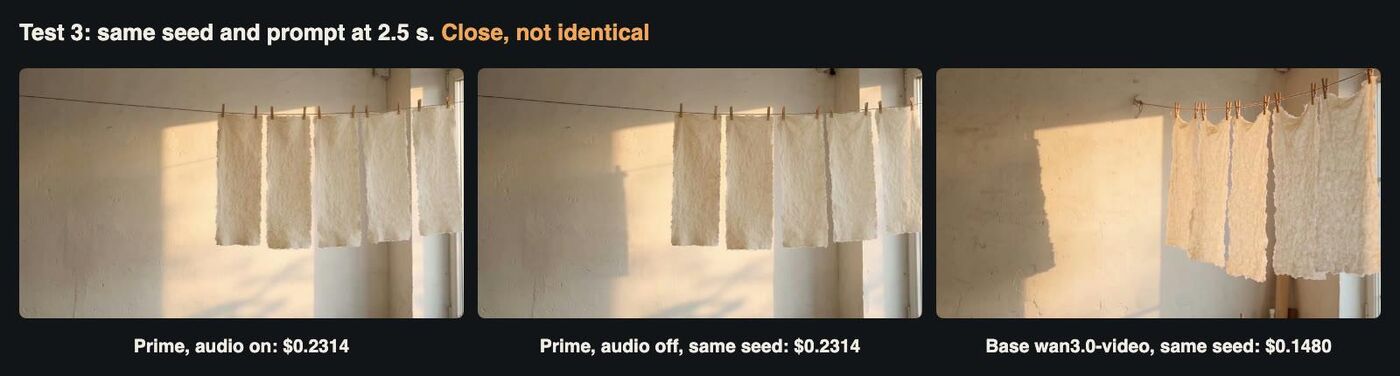
The same seed and prompt, at 2.5 seconds. The base model gave different sheets and more ripple.
Price. Base cost $0.1480 for the 5-second clip against $0.2314 for Prime, 36 percent less. Our account was billed $0.0463 per second at 480P and $0.0926 at 720P, the lowest rates in the pricing table. The table runs up to $0.0514 and $0.1029 depending on account tier.
Output. With the same seed the two models made recognisably related shots. Prime kept the sheets flat and evenly spaced. Base gave crumpled, overlapping sheets and more movement on that side of the frame (0.95 against 0.45), and its encode came out 17 percent larger at 165 KB. For a calm hero we preferred Prime here, but one prompt and one seed is an example, not a verdict. At these prices, running your own prompt on both costs under 40 cents.
Audio. Audio is on by default, and turning it off did not change the price, as the page states. The default clip carried a 127 kbit/s AAC track worth 82 KB. With audio: false the file had no audio stream at all. A muted autoplay hero never plays that track, so set the flag or strip it with -an.
Seed. The audio-off rerun used the same seed but was not pixel-identical: SSIM against the first clip was 0.898. We cannot say how much of that comes from the flag and how much from run-to-run variation.
Test 4: “slowly” did not mean slowly
Looking through the frames, we noticed the sun moving much faster than the prompt asked. In the locked-off clip a window of sunlight sweeps onto the wall within five seconds, and the shadow of the sheets appears with it. So we plotted the mean brightness of the left 55% of the frame for every frame.
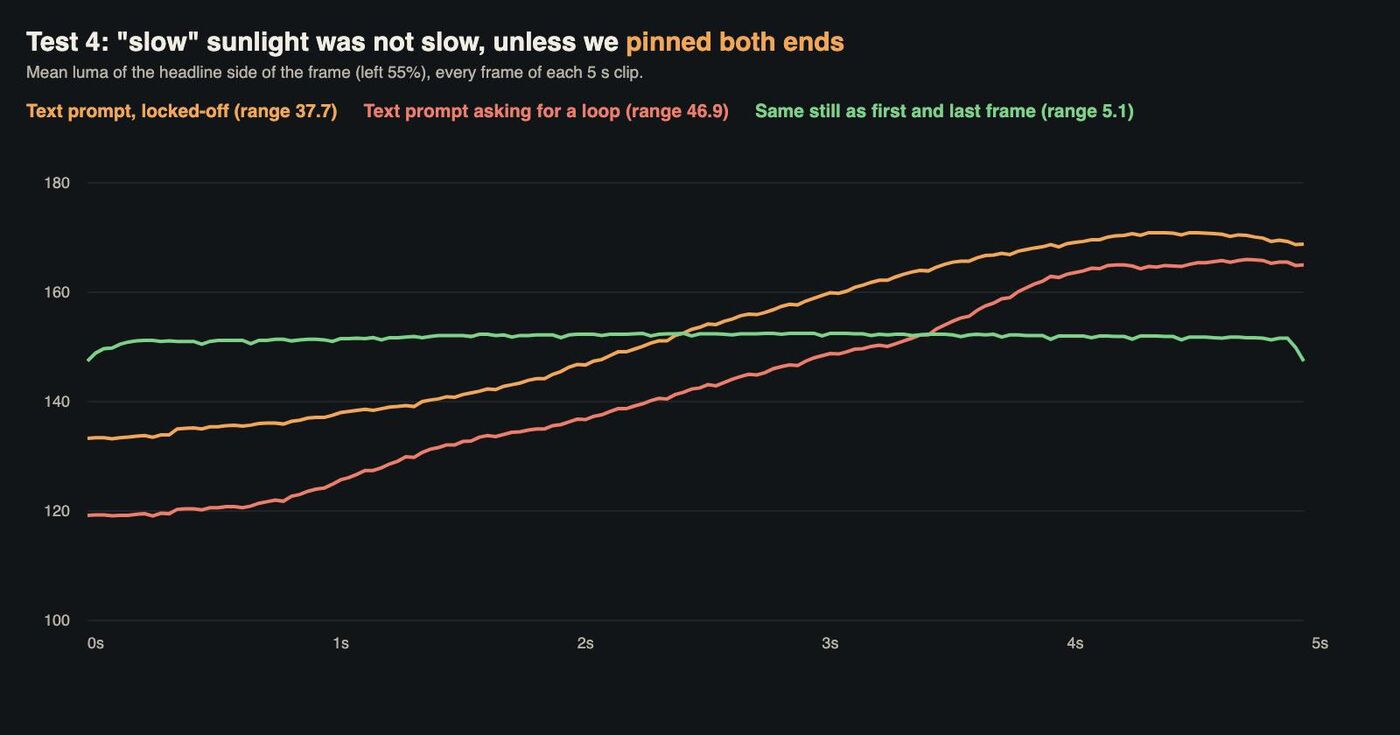
Brightness of the headline side of the frame. Asking for slow light in words did not hold it; pinning the first and last frame did, over 5 seconds.
The locked-off clip climbed by 37.7 levels and the clip that also asked for a loop by 46.9. Our next approach took the words out of the job. We generated one still with an image model, for $0.003, using the same layout description, then passed that image as both the first and the last frame:
"image_urls": [STILL_URL, STILL_URL],
"prompt": "Locked-off tripod shot, the camera does not move. Sunlight drifts slowly across the plaster wall and the paper sheets sway very slightly, then everything returns to where it began. No people, no text, no logos."
The brightness range dropped to 5.1 levels and wall motion to 0.28, half the locked-off value. The encode shrank too, to 108 KB against 140 KB, even though the download was larger at 2,613 KB. The still also let us approve the composition for $0.003 before paying for video. It did not obey every detail, though: we asked for five sheets and it has six, which carried through to the video.
Test 5: what actually makes a clean loop
We compared the last frame of each clip with its first frame, since that is the cut the visitor sees at each repeat. We used two measures: SSIM on brightness over 8 by 8 blocks, where 1.0 means identical, and mean brightness difference. Ordinary neighbouring frames in these clips score about 0.99 SSIM.
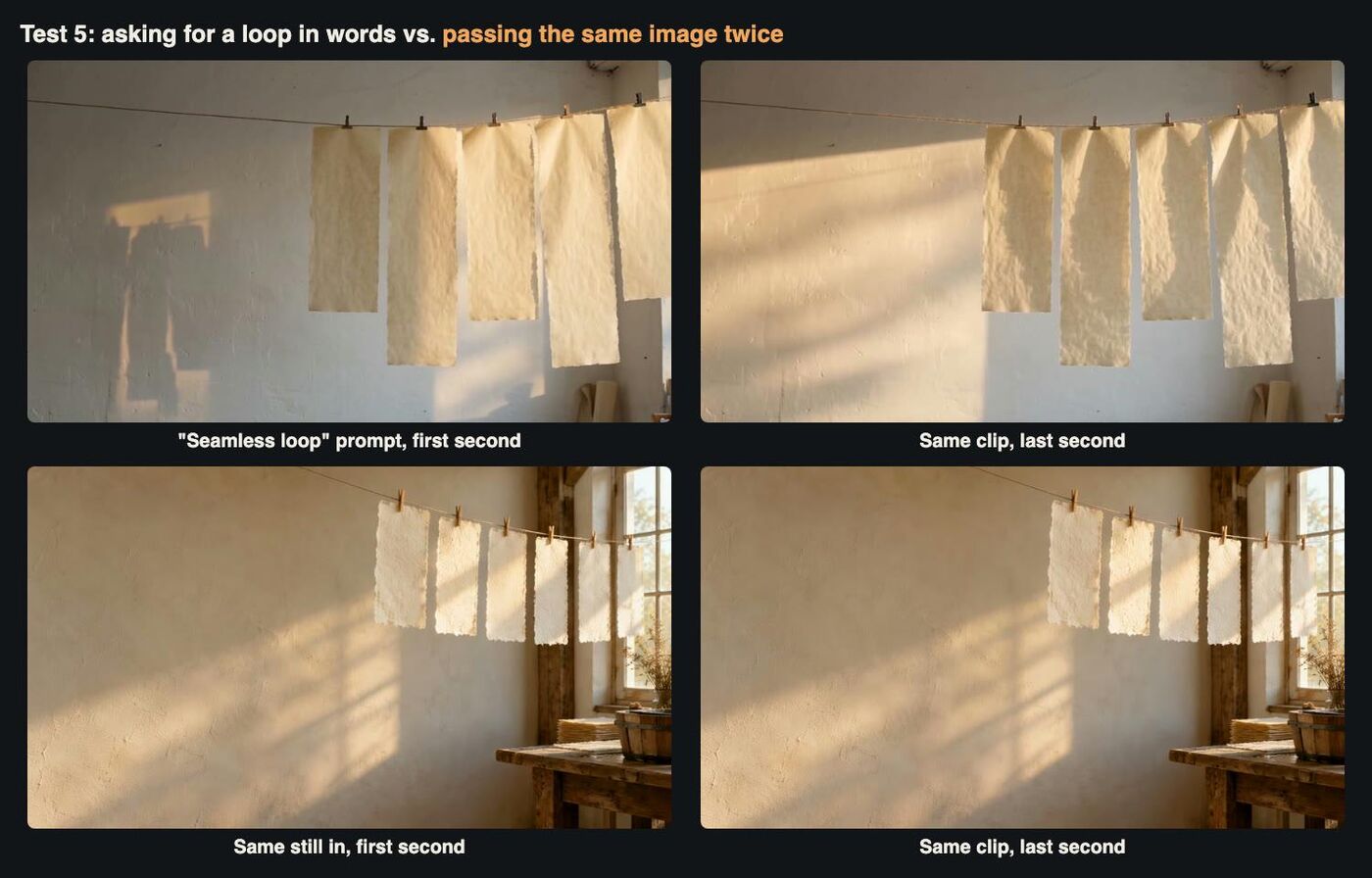
Asking for a seamless loop in words had no useful effect. Passing the same image twice brought the ends together.
| Source and method | Seam SSIM | Seam brightness diff | Length | H.264 CRF 28 |
|---|---|---|---|---|
| “Seamless loop” in prompt, as generated | 0.814 | 33.46 | 5.0 s | 166 KB |
| “Seamless loop” in prompt, 1 s crossfade | 0.953 | 2.34 | 4.1 s | 150 KB |
| “Seamless loop” in prompt, ping-pong | 0.966 | 1.66 | 10.0 s | 324 KB |
| Locked-off, as generated | 0.830 | 29.32 | 5.0 s | 140 KB |
| Locked-off, 1 s crossfade | 0.954 | 2.42 | 4.1 s | 132 KB |
| Locked-off, ping-pong | 0.967 | 1.67 | 10.0 s | 274 KB |
| Same still twice, as generated | 0.957 | 2.13 | 5.0 s | 108 KB |
| Same still twice, 1 s crossfade | 0.965 | 1.74 | 4.1 s | 92 KB |
| Same still twice, ping-pong | 0.940 | 2.40 | 10.0 s | 208 KB |
Writing “seamless perfect loop, the last frame is identical to the first frame” made no practical difference: 0.814, slightly worse than the locked-off clip that did not ask at all. Two approaches did work: first and last frame control in the request, or a crossfade or ping-pong in ffmpeg. Ping-pong doubles the length and roughly doubles the file, and reversed motion can look odd if anything in the shot has a direction.
The ceiling of about 0.96 to 0.97 appears to come from the encoder rather than the clip. Before re-encoding, the same-still clip scored 0.981; after H.264 at CRF 28 it scored 0.957. Our likely explanation is that the first frame is a freshly coded keyframe and the last frame is not, so they differ slightly in detail however well the source matches.
The frame behaviour is documented on theWan 3.0 Prime API page: with no other media in the request, the first entry in image_urls is the first frame and the second is the last, and you cannot mix frames with reference images, video or audio in the same request. Durations run from 2 to 30 seconds. So we rendered the final source that way, at 720P for 8 seconds with audio off, for $0.7406.
This is where the metric fooled us. The 720P clip scored 0.983 at the seam before encoding, the best of the test. Then we plotted its brightness. It climbed from 147 to 165 levels, eased back to about 162, then fell 161.7, 156.1, 147.4 across the final two frame steps. The largest step was 8.75 levels, against 1.37 at the 99th percentile for the clip. The model met the instruction by snapping back at the very end. First and last frames match, so a seam score sees nothing, but on a page that is a quick dip in brightness every eight seconds. The 5-second clip had a smaller version of the same thing, going from 151.6 to 147.4.
The repair is cheap: cut the first and last 0.2 seconds, then crossfade the tail into the head.
ffmpeg -i k-showcase.mp4 -filter_complex "
[0:v]trim=0.2:7.8,setpts=PTS-STARTPTS,split=3[a][b][c];
[a]trim=0:1.5,setpts=PTS-STARTPTS[h];
[b]trim=1.5:6.1,setpts=PTS-STARTPTS[m];
[c]trim=6.1:7.6,setpts=PTS-STARTPTS[t];
[t][h]xfade=transition=fade:duration=1.5:offset=0,format=yuv420p[x];
[x][m]concat=n=2:v=1[o]" -map "[o]" -an
-c:v libx264 -crf 28 -preset slow -pix_fmt yuv420p -movflags +faststart hero.mp4
That gave a 6.1-second loop of 289 KB. The largest brightness step anywhere, including across the loop point, fell from 8.48 in the plain encode to 0.99, and the overall range fell from 18.1 levels to 9.7. These are numbers and frame checks, not a viewing panel, so watch the loop on your own page at full width before you ship it.
Test 6: portrait for phones, generate or crop?
A wide hero on a phone is usually cropped by object-fit: cover, so we compared a native 9:16 clip against a crop of the 720P loop.
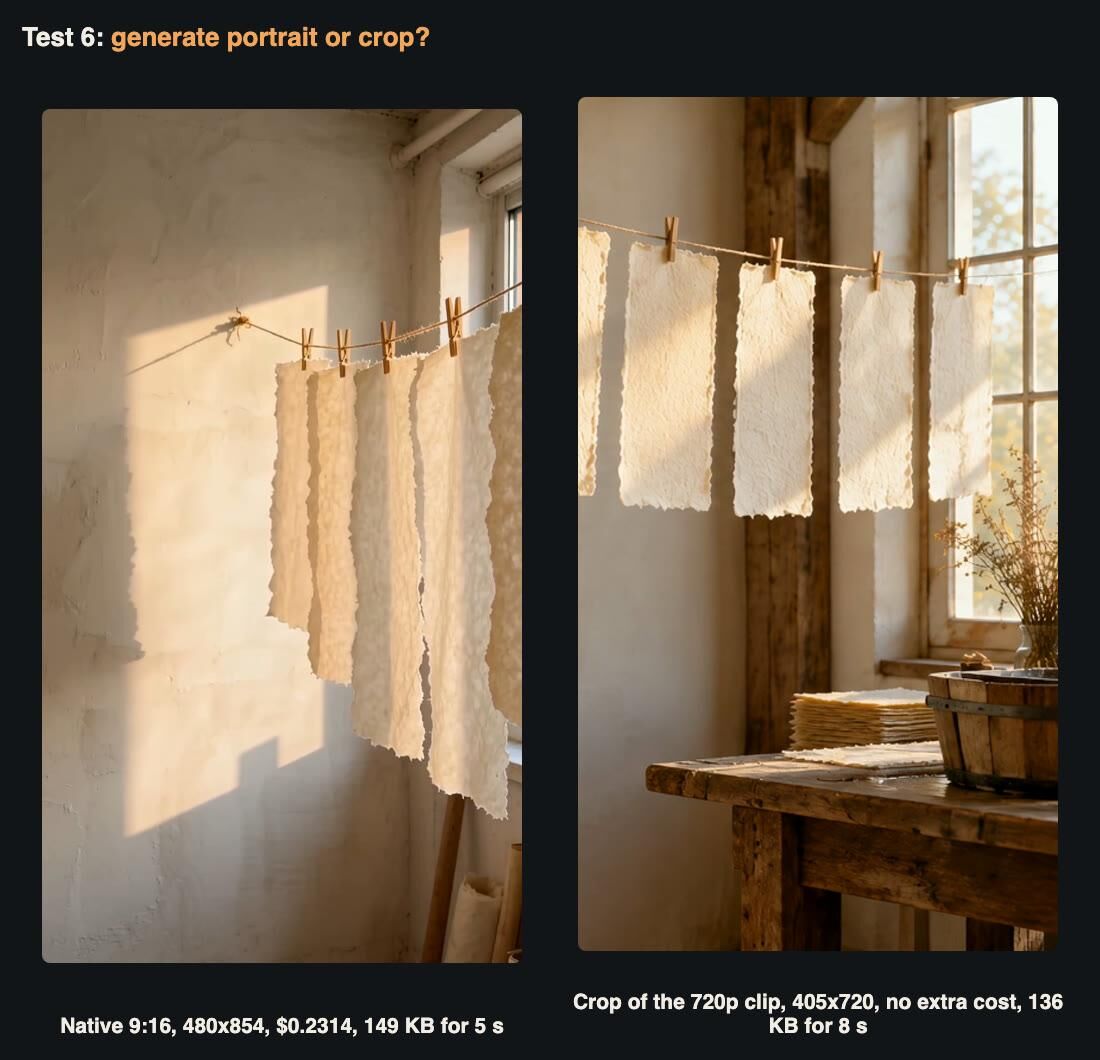
Left: the same text prompt at 9:16. Right: a 405 by 720 crop from the right side of the 720P clip.
The native clip cost another $0.2314 and came back at 480 by 854. It reinterpreted the layout: larger sheets, tightly bunched, with the bright patch of sun behind them. It also repeated the fast light from Test 4, and it does not loop. The crop cost nothing, kept the approved composition and the loop, and came to 136 KB for 8 seconds, against 149 KB for 5 seconds from the native clip. Its weakness is resolution. At 405 pixels wide, it will look soft on a high-density phone screen, though on a background under an overlay that may be acceptable.
For this shot, the crop wins. The catch is that it loses the empty wall, so a phone headline has to sit above or below the sheets rather than beside them. We did not render a 720P portrait clip, so we cannot say how much sharper it would look.
Test 7: the encoding ladder
The 720P file as downloaded was 9,195 KB for 8 seconds, about 9.2 Mbit/s, with its index (the moov atom) at the end of the file. We encoded the plain clip at several settings, using ffmpeg 8.1 and comparing each result with the download.
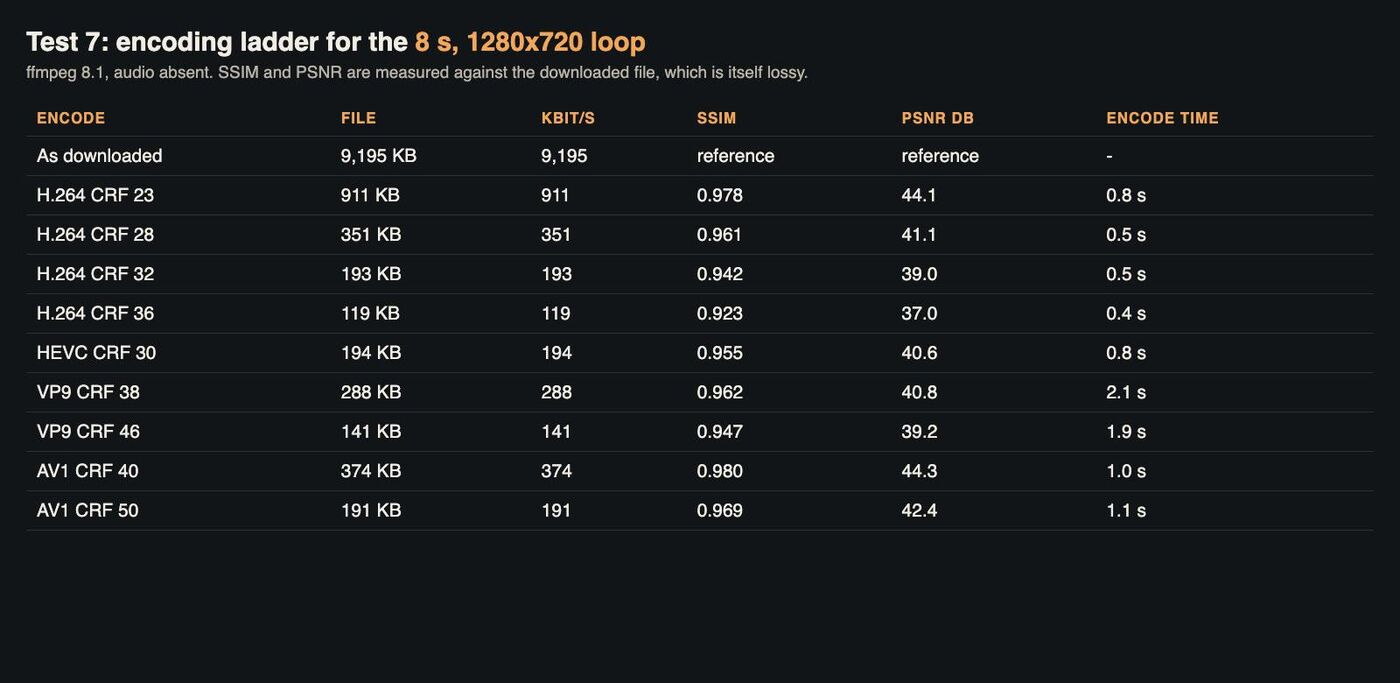
File sizes use 1 KB = 1,000 bytes. The reference is itself lossy, so these scores measure closeness to the download, not to an ideal original.
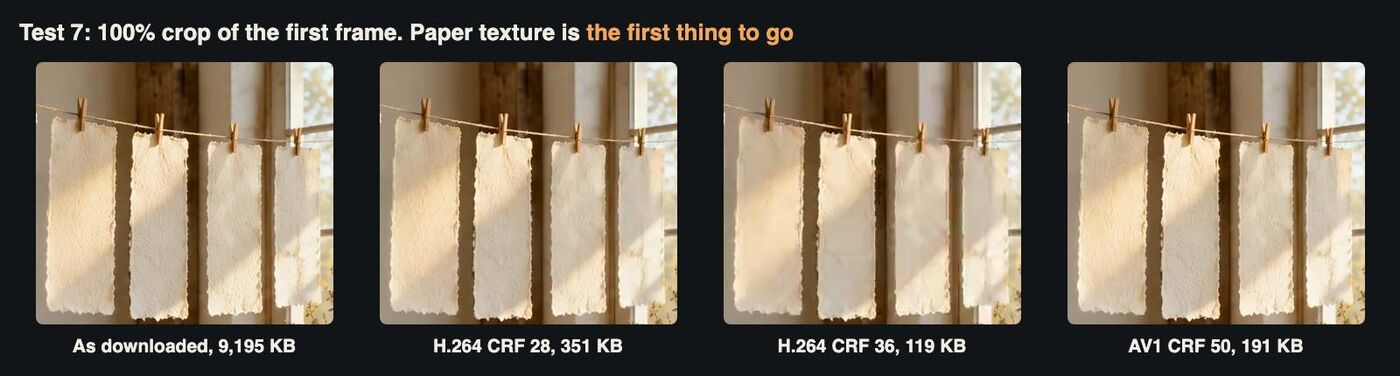
At CRF 36 the paper fibres are mostly gone. AV1 CRF 50 keeps more texture at a smaller size than H.264 CRF 28.
H.264 at CRF 28 is 96 percent smaller than the download at 351 KB, with an SSIM of 0.961. AV1 at CRF 50 did better on both counts: 191 KB and 0.969. VP9 and HEVC land in between. H.264 at CRF 36 hits 119 KB, but the paper texture, which is the point of this shot, starts to wash out. Encoding took about 2 seconds or less at each setting on our machine, so there is no reason not to try several.
Lowering resolution did not beat lowering quality here. A 960 by 540 encode at CRF 28 came to 183 KB with SSIM 0.944 after scaling, about level with 1280 by 720 at CRF 32 (193 KB, 0.942). This ffmpeg build had no VMAF filter, so we report SSIM and PSNR only. After the repair in Test 5, the final files were 289 KB in H.264 and 164 KB in AV1.
Test 8: can you read the headline in the worst frame?
A still preview can pass contrast and the video can still fail a few seconds later. So we checked every frame. For each frame we took the headline box and found the brightest 1 percent of its pixels, then computed the WCAG contrast ratio for white text against them with a black overlay at various strengths. For dark text we used the darkest 1 percent. WCAG does not define a method for moving backgrounds, so this is our own conservative reading of its 4.5:1 ratio.
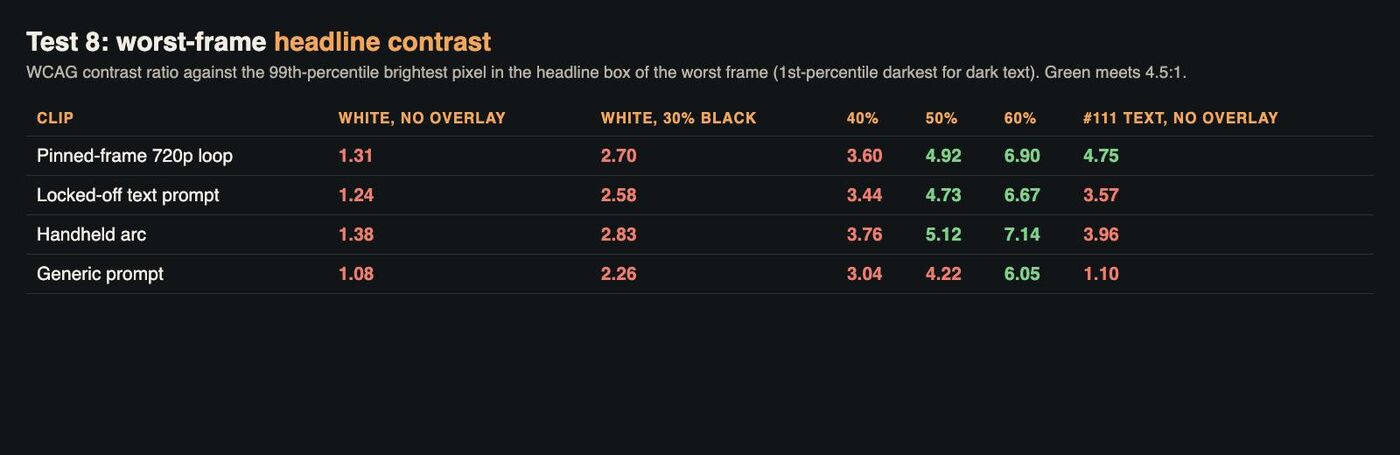
Green meets 4.5:1 in the worst frame of the clip.
White text with no overlay failed everywhere, at 1.1 to 1.4:1, and a 30 percent overlay was not close. Three clips passed at 50 percent, the pinned one at 4.92:1 (45 percent gave 4.20:1 on the repaired loop). The generic clip needed 60 percent. That is a heavy treatment, as the hero image above shows. The more interesting result is in the last column. Near-black #111 text with no overlay passed on the pinned clip at 4.75:1, and at 5.02:1 on the repaired loop, while it failed on the three text-prompted clips, whose walls fall into deeper shadow at some point. Controlling the light is what makes that option available.
Test 9: what changes the page load, measured locally
We built a small hero page and loaded six versions in headless Chrome 156 on one Mac, three runs each, at two viewport sizes. We emulated 1.6 Mbit/s with 150 ms latency, slowed the CPU fourfold and disabled the cache. Assets came from a local server with range support. We recorded Largest Contentful Paint and Cumulative Layout Shift through the browser’s own performance observers, along with the time of the first playing event.
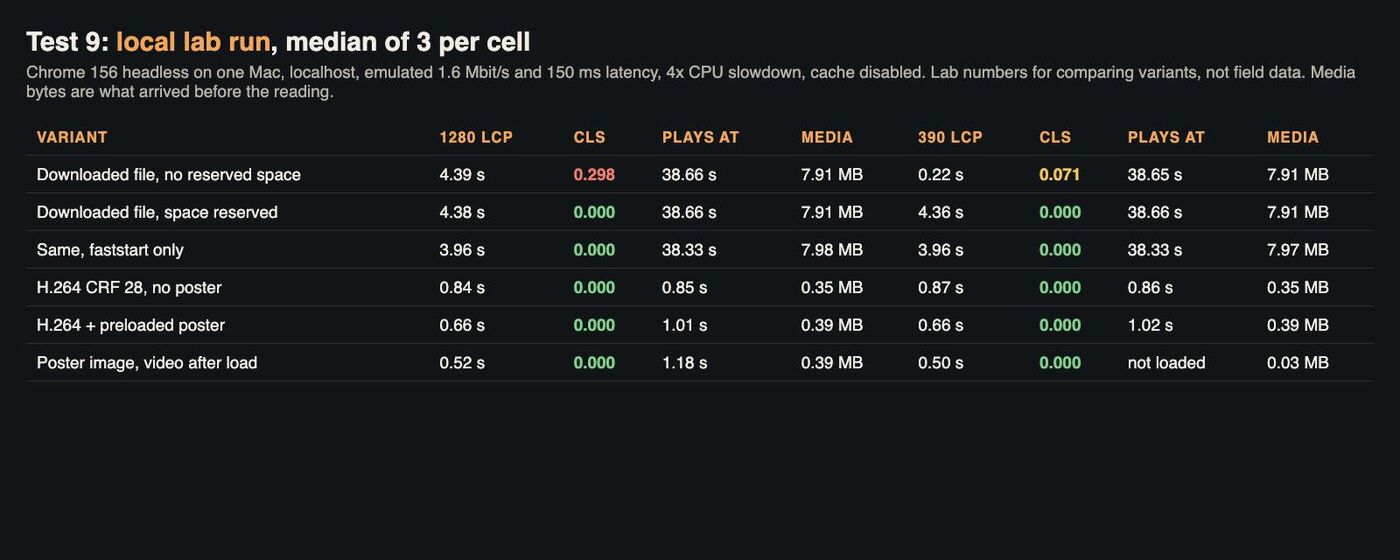
Median of three runs per cell. “Plays at” is the first playing event.
These are lab numbers for comparing variants on one machine. They are not field data, and we have no field data for this page. We did not measure Interaction to Next Paint. We did not test Safari, Firefox or a real phone: the 390-pixel runs are an emulated viewport. The re-encoded runs used the 351 KB H.264 file from before the repair, and AV1 was not part of the run. Within those limits:
- The downloaded file took 38.7 seconds to start playing at this speed, after 7.9 MB had arrived. LCP was 4.39 seconds, above the 2.5 seconds Google treats as good.
- Fixing only the moov atom barely helped. Faststart without re-encoding gave an LCP of 3.96 seconds and playback at 38.3 seconds. A 9.2 Mbit/s file on a 1.6 Mbit/s link is a bitrate problem, not an index problem.
- Re-encoding did nearly everything. The 351 KB file got LCP to 0.84 seconds and playback to 0.85.
- Reserving space fixed layout shift. With no reserved height, CLS was 0.298 on desktop and 0.071 on the narrow viewport. With a fixed hero height and absolute positioning it was 0.
- A preloaded poster improved LCP and slightly delayed playback. A 34 KB WebP brought LCP to 0.66 seconds, while playback moved to 1.01 seconds. Chrome reported the poster as the LCP resource.
- A poster image with the video added after load was fastest. LCP was 0.52 seconds and playback 1.18. On the narrow viewport our script skipped the video altogether, so media came to 34 KB rather than 385 KB.
One row is a warning about reading these metrics alone. The worst version on the narrow viewport reported an LCP of 0.22 seconds, because a text paragraph was the largest element when the video had not rendered yet. The visitor still waited 38.65 seconds for motion. A good LCP does not tell you the video is working, so track the start of playback separately.
The markup for the last variant, which we recommend as a starting point, looks like this. The width check ran in our lab; the reduced-motion condition is in the same script, but we did not exercise that branch.
<div class="hero" style="position:relative;height:80vh;overflow:hidden">
  <img id="poster" src="hero-poster.webp" width="1280" height="720" alt=""
       fetchpriority="high"
       style="position:absolute;inset:0;width:100%;height:100%;object-fit:cover">
  <!-- overlay and headline here -->
</div>
<script>
addEventListener("load", () => {
  if (innerWidth < 768 ||
      matchMedia("(prefers-reduced-motion: reduce)").matches) return;
  const v = document.createElement("video");
  v.muted = v.loop = v.autoplay = v.playsInline = true;
  v.style.cssText = document.getElementById("poster").style.cssText;
  v.innerHTML = '<source src="hero.mp4" type="video/mp4">';
  document.getElementById("poster").after(v);
});
</script>
If you add an AV1 source, list it first and keep H.264 as the fallback, then confirm in each browser you support which file actually loads. We did not run that check. Also give visitors a way to pause. A moving background that runs for more than five seconds needs one under WCAG 2.2.2, and our test page did not include it.
What it cost
| Item | Count | Rate billed | Cost |
|---|---|---|---|
| First and last frame still (image model) | 1 | per image | $0.0030 |
| Wan 3.0 Prime, 480P, 5 s | 9 | $0.0463/s | $2.0829 |
| Wan 3.0 base, 480P, 5 s | 1 | $0.0296/s | $0.1480 |
| Wan 3.0 Prime, 720P, 8 s | 1 | $0.0926/s | $0.7406 |
| Total | 12 | $2.97 |
Most of that is testing. Producing the finished hero with the recipe we ended up with costs one still and one 720P clip, about $0.74, or a few cents more if you draft stills first.
A checklist for AI-generated hero video
- Describe the empty space in the prompt. Say what fills the headline side, and allow for the model being loose about proportions.
- Approve a still first. A still costs a fraction of a clip, and first and last frame control makes it the shot you get.
- Pass the same image as first and last frame. Writing “seamless loop” in the prompt did nothing measurable for us.
- Plot brightness over time, not just the seam. Our best seam score hid a sudden drop in the last two frames.
- Trim and crossfade anyway. Cutting 0.2 seconds from each end and crossfading for 1.5 seconds removed that fault for free.
- Never ship the downloaded file. Re-encode, drop the audio and use faststart. Faststart alone is not enough.
- Check contrast on the worst frame. Test every frame of the loop under the headline box, not a single screenshot.
- Reserve the space, preload a poster and measure playback start. Consider skipping the video on small screens, and give visitors a pause control.
The bottom line
Wan 3.0 Prime handled the part that used to require a shoot. For under a dollar of final render it produced a calm, usable shot with room for a headline, once we controlled it with a still rather than with adjectives. It did not produce a web-ready asset, and we would not expect any generator to. The 9.2 MB file needed a repair for a brightness drop that our first metric missed, a 96 percent size reduction, a poster and a reserved layout box. In our local test that work moved playback start from 38.7 seconds to about one second. If you run a hero through this process, measure it on your own hosting and with your own visitors, because our numbers only tell you which changes were worth making.