Design.com: Is It The Best Website Builder Tool?

Looking to build a polished and professional website?
In 2026, you no longer need advanced coding skills, extensive designer background, or the big bucks to hire a developer. DIY website builders have made it possible for anyone and everyone to establish their online presence without the hassle. No need to code from scratch – just use a template from a website builder, customize with your business info, click Publish, and you’re all set!
But the popularity of these website builders also means that there are hundreds of them floating on the market. How do you know which one is worth your time?
Design.com is one of the leading branding platforms on the market, and their website builder tool is said to be one of the best website builders around. We put the tool to the test to see if it lives up to the hype, as well as take a deep dive into its features and website-making process.
Check out our review below.
What is Design.com’s Website Builder?
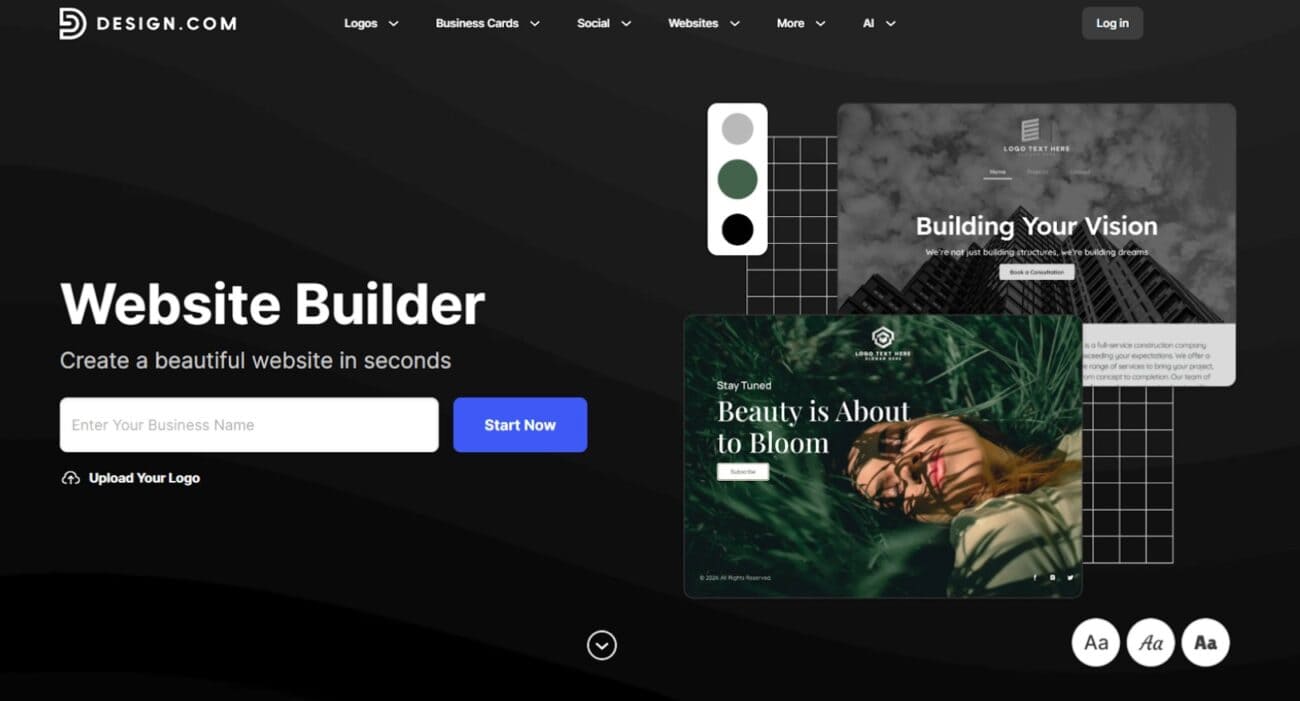
Design.com is said to be the best website builder for users who want a professional website without all the complicated setup or advanced technical settings.
Here, users can access thousands of customizable templates across various styles and industries. Since these templates are pre-made, users won’t need to code or illustrate anything from scratch. They just need to choose a template, customize it with their branding, and then publish. Design.com also handles hosting and domain names, so users won’t need to worry about those either.
Design.com also has an AI website builder for an even faster and easier process. You only need to enter their business name or keyword, and the AI will use that information to create suitable websites to choose from. Just like the templates, the users can fully customize these AI-generated websites to fit their needs.
Unlike many standalone website builders, Design.com positions its website tool as part of a broader branding ecosystem. Once you create a website on the platform, you can automatically apply its styling across other materials like business cards and social media graphics. This ensures visual consistency, making it easy to build a recognizable brand identity that your audience can remember you by.
How the Website Builder Works
Let’s now take a look at how Design.com’s website builder works:
- Go to https://www.design.com/website-builder. Type your business name and click Start Now.
2. Browse the templates. You can add keywords if you want more specific results.
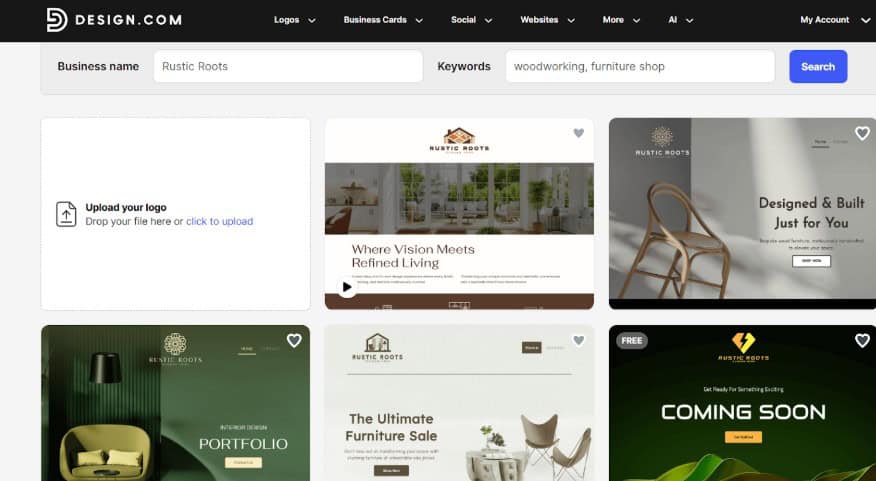
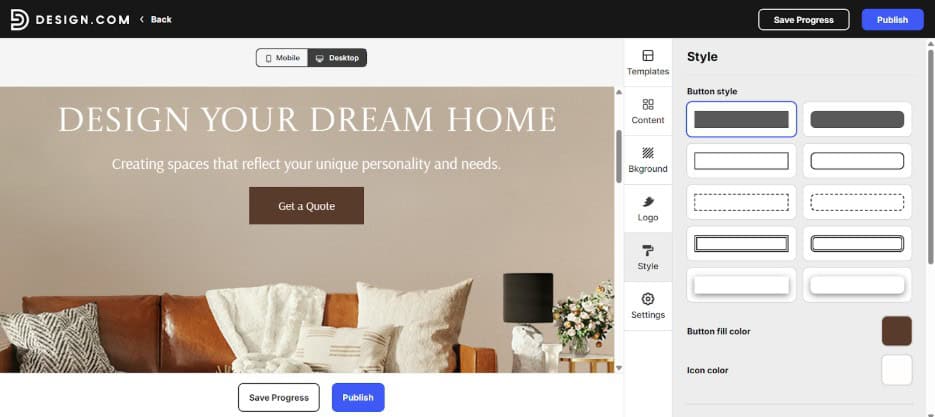
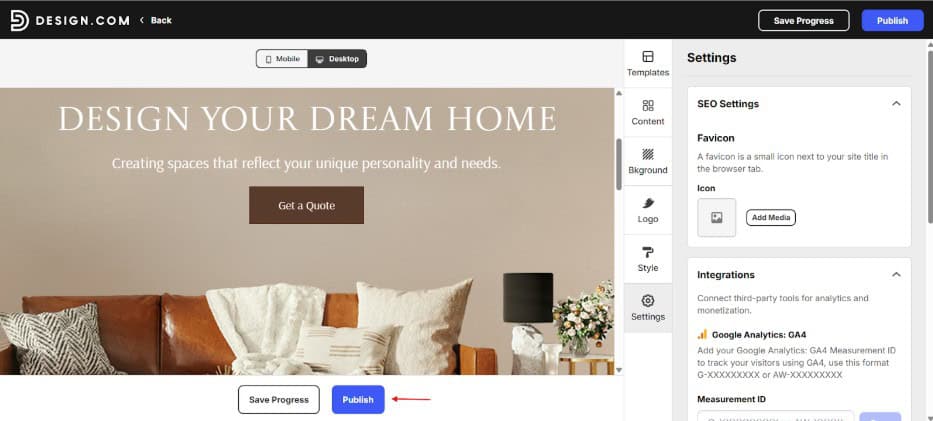
3. Click the design you like. You will then be taken to the editor. Here you can change the elements of the page such as the layout, font, and color, down to the button styling or the message that will appear on your contact forms.
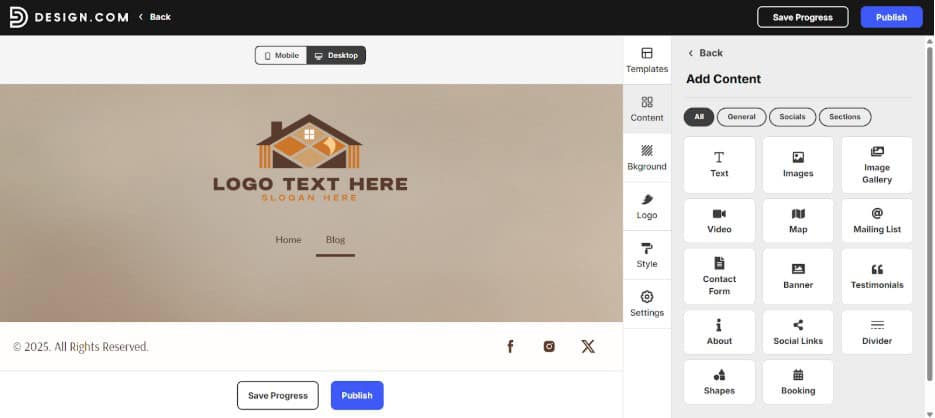
4. If you want to add more pages, just go to the Content tab then click + Add New Page. You can then add features that you need such as videos, maps, appointment booking, and more.
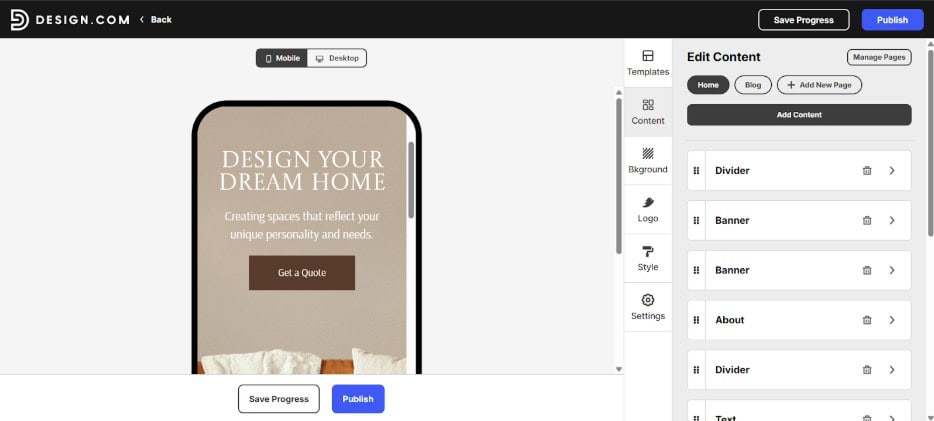
5. You can also click the Mobile or Desktop toggle on the top to see how your website looks on either platform.
6. Happy with how it looks? Click Publish to set your website up and running.
Key Features of Design.com Website Builder
Here is the breakdown of Design.com’s website builder main features:
- Customizable templates – Access thousands of premade templates to edit and customize.
- Wide range of designs – Templates are available in various styles, types, and industries. Websites range across food trucks, hair salons, gaming apps, bands, financial consultants, pharmacies, rental lodgings, and more.
- AI website builder – Users can also access a smart AI website builder, which only needs your business name and keyword to work. Users can also ask the AI to generate over and over again, as there are no limits here, unlike other AI generators.
- No code editor – Design.com features a simple drag and drop editor and straightforward controls so users can easily tweak their websites.
- Full customization – Users can edit every detail of the website, from the color, font, text, layout, spacing, icon, shape, content, etc.
- Essential business tools – Design.com supports integrations such as online booking, online payment, contact forms, maps, mailing lists, social links, Google Analytics, and many more.
- Responsive design – All websites are optimized to function seamlessly and look good across web, mobile, and tablet devices.
- One-click publishing – Once your site is ready, publish instantly with a single click and without the complicated technical setup.
Why Use Design.com Website Builder?
What makes Design.com a better option than other website builders in the market? Here are our thoughts:
- Quick and hassle-free – With the customizable templates and the AI builder, it’s easy to have a website running without the hassle.
- Great designs – Design.com’s templates are made by top designers all over the world. This means that each website is polished, high-quality, and ready for business use. These are not low-quality placeholders, but a professional website that you can use without any worry and that can compete with websites from big brands.
- Exclusive designs – Design.com’s templates and AI pull from their exclusive library of fonts, shapes, and icons that are only available on the platform. They do not source from stock libraries or clip art. This is why the designs are unique and high-quality, and won’t be found in other website builder tools.
- Creative freedom – Design.com gives a strong foundation, but users have the freedom to fully customize the look and content of their website. You can move text blocks, insert icons or background graphics, and adjust components to better match your visual identity. This elevates the website from a preset or generic look and makes it feel uniquely yours.
- Simple yet comprehensive – Design.com is designed to make simple and straightforward sites. Still, they offer essential business tools such as online payments, responsive design, contact forms, and more. This allows users to launch a professional presence and handle business directly on your website, without having to deal with technical add-ons and integrations.
- All-in-one platform – Design.com offers tools beyond websites, such as logos, social media graphics, posters, email signatures, and more. You can get everything you need to start your business in one place.
Points to Consider
Design.com is indeed powerful, but it might not rival dedicated website builders that prioritize enterprise-level technical integrations, custom feature capabilities, or large-scale e-commerce functions. It is made for small businesses and startups in mind, so you might not need these advanced features anyway.
Design.com Website Builder Pricing and Plans
Interested with using the tool? Here are the pricing plans to keep in mind:
Free Plan
The free plan includes:
- 1 website with hosting
- Design.com watermark
- Up to 3 pages only
- Limited website editor
- A contact form
- Video embedding and map integration
Free plan is indeed free, no hidden charges. It does come with a watermark though and some limitations. Still, you can get a polished and functional website even with the free plan.
Paid Plan
The paid plans include:
- 1 website with hosting
- Access to premium website templates
- Unlimited pages
- Full website editor access
- Free custom or branded URL
- Ability to connect a custom domain
- Contact form and email capture tools
- Image gallery and image library
- Video support
- Accept online payments
- 24/7 customer care
Paid plan costs $9 per month (billed monthly) or $6 per month (billed annually). It’s a cost efficient and competitive pricing compared to other builders.
Conclusion
Design.com’s website builder is a great choice if you want a simple way to build a professional website without sacrificing design quality and business functionality. The customizable templates, AI website builder, essential business tools, flexibility, and affordable pricing make it especially worthwhile for small business owners, freelancers, and new entrepreneurs.
It may not be an advanced or specialized builder for complex or enterprise-level projects, but for most website needs, you can confidently rely on it to put your brand online. It does live up to their promise and reputation!